2025 My Year of Linux Desktop
Introduction
At the begining of 2025, I was so wanting to build a PC because I watched a lot of youtube videos about linux and hyprland. I spent a lot of time to learn how to assemble a PC and then in March, I finally pulled the trigger and it took me a couple of days to gradually complete the build.
At the moment, the beautiful PC is placed below my desk using an under desk PC mount and except the noise, I am pretty happy with it in terms of the apperance and performance. As you might have guessed based on the title of this post, I installed linux on it with no doubt. I did a lot of research to make sure the hardware I was going to buy are fully compatible to Linux.
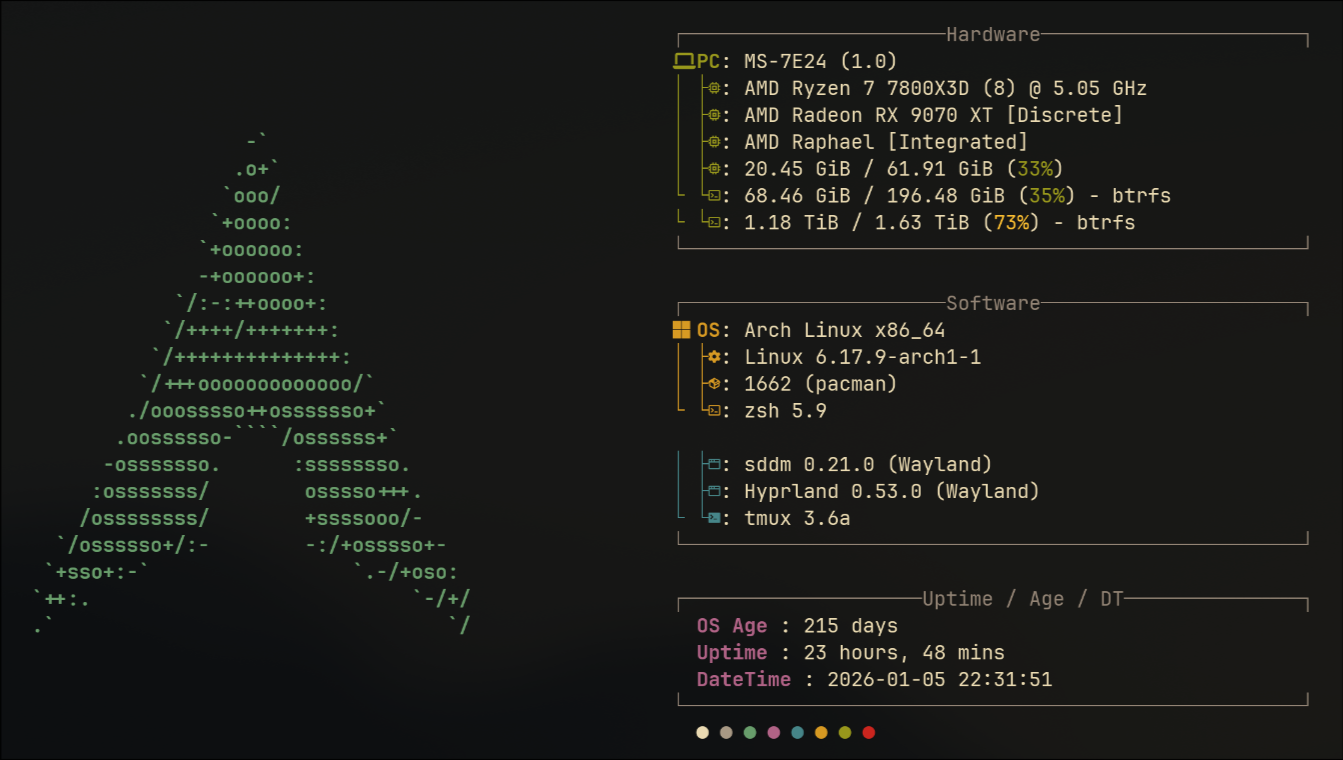
I am currently using Arch (by the way) with hyprland. I use it for everything I do in a computer. I am really impressed with the power of linux and how much open it is. Before I settle down with this distro, I also did distro hopping like a lot of linux users. I’ll explain the reason in the next section. But before that, this is the screenshot from my fastfetch
My linux journey
CachyOS
I initially started using CachyOS as it features “Blazingly fast” which attracts. This is my first linux distro since 2008 so I can’t really tell if it’s that fast given my PC is pretty powerful as you can tell from the screenshot above. But the overall experience is pretty good and I started to find my feet in Linux world. However, there is a graphic issue when I was playing dota2 that part of screen will turn black when my hero cast a magic. This really degrade my joy of using Linux so I wonder if this is an issue with the CachyOS or not. As a result, I started looking at the other distro and I quickly decided bazzite is my next one to try.
Bazzite
The installation exeprience is as smooth as CachyOS. They both have a nice UI and you only have to click a few things and then start the installation. Bazzite comes with a lot of pre-installed packages that I really appreciate especially for people like me who is completely new to Linux as well as gaming which includes steamos, mangohud and other gaming stuff. Bazzite uses KDE and I’ve got used to it when i was experimenting CachyOS but I really want tiling window manager as that allows me to control my window via keyboard.
As a software engineer, I really like the immutable file system idea which bazzite is built atop because that gives you an environment that can easily control but I also lose the flexiblity of Linux particularly Arch. In CachyOs or Arch based system, we have the well-known AUR backed. Any time, you want to install something. Just simply do paru -Sy or yay -Sy. I am sure 99% of time you will be surprised that this package exists and also amazed by the community behind Arch eco system. Immutability does come with a drawback about installing packages. For most of utility clis, it’s probably fine because you can use homebrew (Yes, homebrew is ported to linux) but for system level packages such as hyprland, you really need to find a different way to install it. Bazzite is actually based on the Fedora Silverblue and there is also a community version based on it that has hyprland pre-installed as image layer (if you are familiar with container, i am sure you will be knowing this concept). It’s called wayblue but I was too lazy to try it because I will lose the convenience provided by Bazzite.
I also had an issue playing Black Myth Wukong using proton in Steam. When the story goes into a scene, it always crashed the entire desktop environment and I was very unhappy with it. In order to play game smoothly, my last resort goes to Windows. I had to wipe the entire disk and installed a new windows 11 on it.
Windows 11
To be honest, I don’t resist using Windows 11 but I found it really too bloated nowadays. M$ really squeezed a lot of useless stuff (from an Operating System’s perspective) into it and makes me feel uncomfortable using it. I used the Chris Titus Tech’s Windows Utility to debloat it and also install a lot of software, which is really convenient. I haven’t used windows for a decade and this is actually an awesome experience compared with what I did before when I was still a windows user.
I also installed a tiling window manager (can’t remember the name) and used the WSL. Overal experience is not that bad but I know I really want to go back to Linux world. I continued playing Black Myth Wukong in windows and it’s working perfectly until you got that well-know AMD driver timeout issue, which also annoys me. Finally, I wiped the disk again and now trying a pure Arch experience.
Why I want to use pure Arch? I watched some videos on youtube comparing the performance between various distros: Arch, CachyOS, Bazzite etc. In terms of gaming performance, they are actually quite similar. It doesn’t sound like what the distro advertises, which I think make sesnse because under the hood, they are using same hardware. Software optimization might play a part but the key difference is still up to the hardware. So this time, I decide to try a real Arch experience.
Arch
Downloaded the iso from arch official website and load it into the usb disk. Arch installation is actually pretty good now if you are comfortable with cli and you know what those are about because the ISO has provided a utility called: archinstall. The only thing is you need to use the network cli to connect to wifi because packages will all be downloaded from online. After a number of cli selections in archinstall utility including timezone, locale, user setup, desktop environment etc, the setup experience is also good in my opinion.
After installing KDE, I’ve manually installed all packages I use and start playing the same game on it. It’s also super smooth and sharp thanks to my AMD 9070XT GPU. I also started installing hyprland following some article and finally settled down here.
I’ve made some shell script to automate the installation in the future but haven’t really verified it.
Some issues
Linux is not perfect so there are alwasy some issues but because i’ve done a lot of research on buying hardware, these issues are actually manageable.
Bluetooth
Bluetooth is something i’ve got a lot of issues with. My devices are basically all wireless: keyboard, mouse, headphone and ps5 controller. If i just connect two of them, it’s fine. But once i start connecting more than two devices, the cursor will become very laggy. I’ve tried a lot of suggestions from AI but it’s not helping. Same scenario works perfect in Windows. I finally bought a bluetooth USB adapter and made two devices connecting to it. This is working fine since.
Arch rolling update
Rolling update sounds very fancy because you live on the edge but it also put you into risk as something might break. I’ve got issue a couple of time after I do system upgrade. Each time, I had to spend a night to fix the issues. For example,
- 2025 May, I updated the linux kernel but system won’t boot up because the update splits those drivers into different packages and I eventually rolled back to old version and skip that upgrade.
- 2025 Dec, I updated the linux kernel but my secondary monitor won’t be waken up after suspend. At the end, i found it’s an issue with the 6.18.2 kernel version so i rolled it back to the working version but it took me a lot of time to figure it out the issue was caused by kernel.
- 2026 Jan, I updated hyprland and all my windowrules are broken so i had to re-write my windowrules.
There are also other minor issues also occured on using my bluetooth headphone. I won’t bother talking about them here.
If you use the machine for profesionall work, you really want something reliable and stable. Otherwise, you just waste a lot of time fighting non-work related stuff. I have a lot of time that I want to go back to Mac world but nowadays I really don’t like Apple given how expensive their products are and their product strategy. With same money, I got much better hardware.
Final
Linux is not perfect but i think its desktop eco system has evolved to a stage that suits a lot of people’s daily needs: browsing, word processing. But there are still a long way to go if it really wants to attract more normal users into its world. For myself, I am definitely enjoying the time in the open source world and will continue my journey in 2026!